Storage SMS OTP
Files for the Storage SMS Provider are located at axidian\Axidian Providers\Storage SMS OTP Provider\<Version number>\.
- AuthProviders.StorageSmsOTP-x64.msi: The installation package of Storage SMS OTP Provider.
- SMSOTP.Password.Encryptor.exe: The utility for the encryption of SMS gateway password.
- \Misc: The folder contains policy templates.
About Storage SMS OTP
Storage SMS OTP is supported only in scenarios with the the Radius Extension component.
If you plan to keep the Axidian data in the SQL database, use Storage SMS OTP Provider. This provider allows you to store, receive, and update the Axidian Access users' phone numbers in the SQL database. Phone numbers are stored in encrypted form.
Storage SMS OTP Provider requires SMS gateway. This gateway must be accessible from every Axidian server where Storage SMS OTP is installed.
To use the authenticator, a user must define a phone number in the telephoneNumber attribute. Otherwise, the authenticator will not be available.
Authenticator registration in User Console is not required.
Install the provider
- To install Storage SMS OTP Provider, run the AuthProviders.StorageSmsOTP-x64.msi installer.
- After the installation is complete, restart the system. If the installation wizard prompts you to restart the system, confirm this action.
- To remove or restore the product, open the Control panel menu and use the standard procedure for the supported operating systems.
Register the provider
Use the lightweight version of the Axidian EAPhoneServer API to register providers. This solution is specially designed for Storage SMS OTP. Alternatively, you can use the main API of the Axidian system.
Configure authentication parameters
Before you proceed, add the Axidian policy templates to the administration template list. Policy template files are included into the installation package and and are located at the Misc folder.
SMS delivery service
The policy applies to Axidian servers. It allows to configure the following settings to use with SMS server:
Use tls: Defines whether to use the encryption or not.
URL(IP address): Address of the server to connect to.
Port: Connection port to use.
SystemId (Username): Account name to connect to the server.
Password: Account password to connect to the server.
infoThe password can be defined either explicitly or in the encrypted form. To encrypt the password, use the StorageSMSOTP.Password.Encryptor.exe utility from the installation package of the provider.
SystemType is the field for the PDU operation BIND_TRANSCEIVER of the SMPP protocol.
Sender defines the sender name displayed to the SMS message recipient.
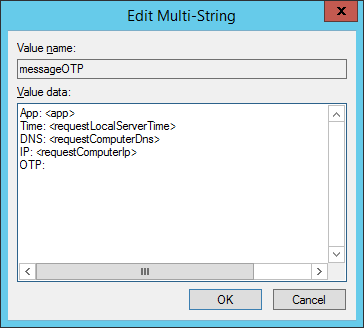
Additional text before OTP defines the message text that precedes the OTP. By default, only OTP is sent. For advanced settings, use the following parameters:
- <app>: Name of the application that sent the authentication request.
- <requestLocalServerTime>: Local server time of request receiving.
- <requestComputerDns>: DNS of the computer that sent the request.
- <requestComputerIp>: IP of the computer that sent the request.
infoThe OTP code display is not configurable. It is always displayed at the end of the message.
To configure the word wrap in the message, modify the HKLM/SOFTWARE/Policies/Axidian-ID/BSPs/StorageSMSOTP registry key. Change the messageOTP parameter of the REG_SZ type to messageOTP of the REG_MULTI_SZ type.
SMS status timeout: Timeout of receiving the status of the SMS from the server.
PDU with SMS status: PDU that server send the status of the message sent in.
source_addr_ton: Type of Number for the teh source address.
source_addr_npi: Numbering Plan Indicator for the source address.
dest_addr_ton: Type of Number for the destination.
dest_addr_npi: Numbering Plan Indicator for the destination.
esm_class: Message Mode and Message Type.
registered_delivery: Indicator of request for SMSC or SME confirmation.
data_coding: Encoding scheme for user data in the short message.
Configure message format
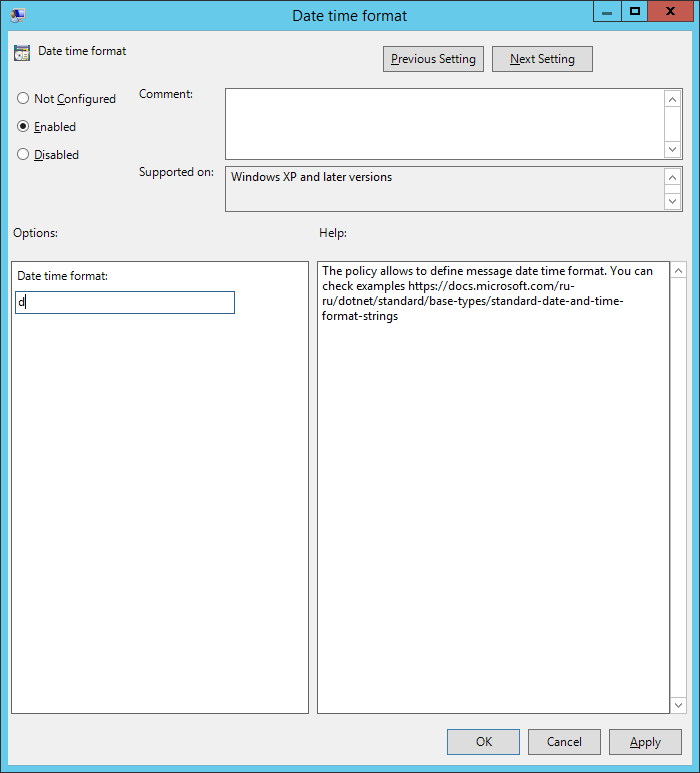
Use this policy to define the settings of date displayed in the message. See format examples on the Microsoft official site.
Enabled
The date is displayed according to the format set in the policy.
One-time password generation settings
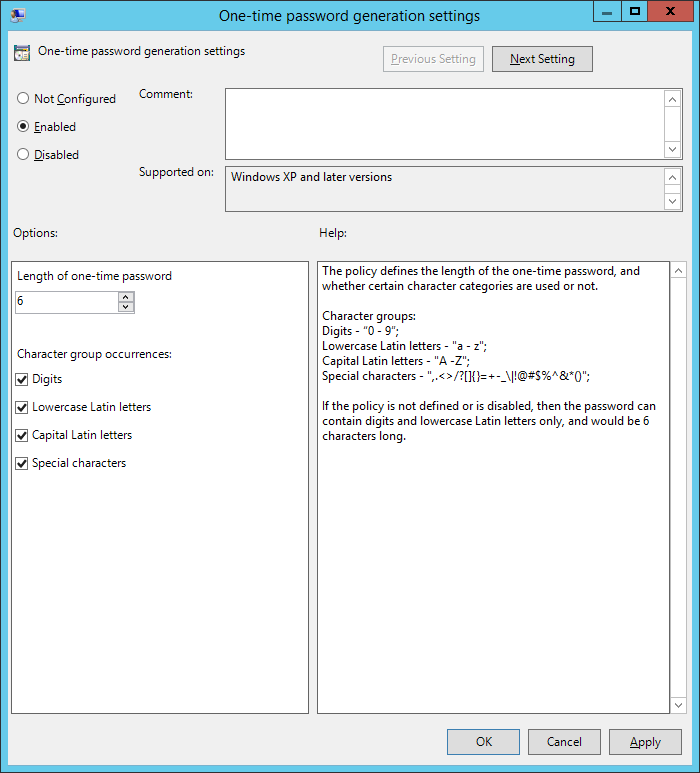
The policy applies to Axidian servers. It allows configuring one-time password length and using character groups to generate passwords.
Not Configured or Disabled
If the policy is not configured or disabled, the generated password is 4 characters long and contains digits only.
Enabled
One-time password is generated according to the policy parameters. If the policy is not defined or is disabled, then the password can contain digits and lowercase Latin letters only, and consists of 6 characters.
Settings of concurrent connection to SMPP server
The policy applies to Axidian servers. It allows configuring the processing order for requests to the SMPP server. The policy is required if the SMPP server does not support multiple simultaneous connections from a single user (account defined in the SMS delivery service policy).
Not Configured or Disabled
Connections to the SMPP server and message sending requests are performed in parallel.
Enabled
Connections to the SMPP server and message sending requests are performed in sequence.