Software OTP
Files for the Software OTP Provider installation are located at axidian\Axidian Providers\Axidian Software OTP Provider\<Version number>\.
- Software OTP Provider.msi: The installation package of Software TOTP Provider.
- \Misc: The folder contains policy templates.
Files for Bsp Broker are located at axidian\Axidian Providers\Axidian Bsp Broker\<Version number>\.
- AuthProviders.BspBroker.x64.msi: The installation package of Bsp Broker.
About Software OTP Provider
Software OTP provides for two-factor authentication based on software methods. An authenticator is a one-time password that must be provided by a user in addition to username and password to access the required application.
One-time password is generated autonomously on the user mobile device with a help of a special application. The password generation is based on two parameters: private key, which is defined at the authenticator registration stage, and current time.
The authentication technology is based on the system where only one correct one-time password is possible for the defined private key at any given moment of time. Therefore, with the private key, the server can verify the one-time password provided by a user. Consequently, the time on the mobile device and on the authentication server must coincide for the technology to function correctly. However, discrepancy is possible. Its value is defined by the administrator.
Install the provider
- To install Software OTP, run the Software OTP Provider.msi installer.
- After the installation is complete, restart the system. If the installation wizard prompts you to restart the system, confirm this action.
- To remove or restore the product, open the Control panel menu and use the standard procedure for the supported operating systems.
Configure authentication parameters
Before you proceed, add the Axidian policy templates to the administration template list. Policy template files are included into the installation package and are located at the Misc folder.
Configure policies to enhance security. However, Software TOTP can function properly with default policy values.
One-time password validity period
The policy defines the minimum validity period of one-time password during enrollment. The period is defined by integer from 3 to 18, where 3 corresponds to time interval of 30 seconds (+/- 15 seconds). Define the policy at the system clients where authenticator enrollment is carried out (user workstations). If the policy is not defined, the default value (6) is used.
Minimum PIN code length
The policy makes it possible to define the minimum number of characters that PIN code must consist of. The permissible range is from 4 to 25 characters.
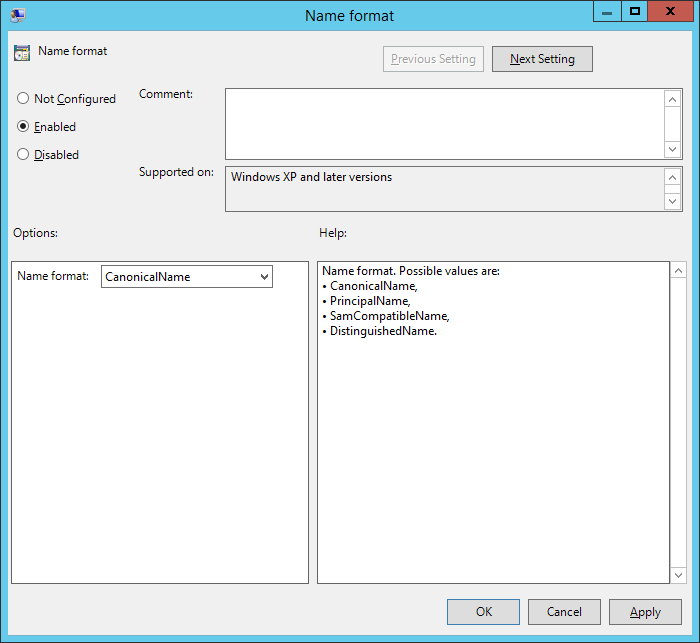
Naming format
The policy applies to servers with Management Console installed. If the policy is not applied, the username is used as the name of OTP account.
The policy allows you to set the user parameter that is used as the OTP account name, which is encrypted within a QR code. Possible values are: CanonicalName, PrincipalName, SamCompatibleName, DistiguishedName.