Deployment Architecture
This section describes the possible deployment options for Axidian Privilege components. The choice of deployment scheme depends on testing and production scenarios: the set of components and servers, as well as their roles, may vary.
- Basic scheme
- Fault-tolerant scheme
- Windows deployment
- Linux deployment
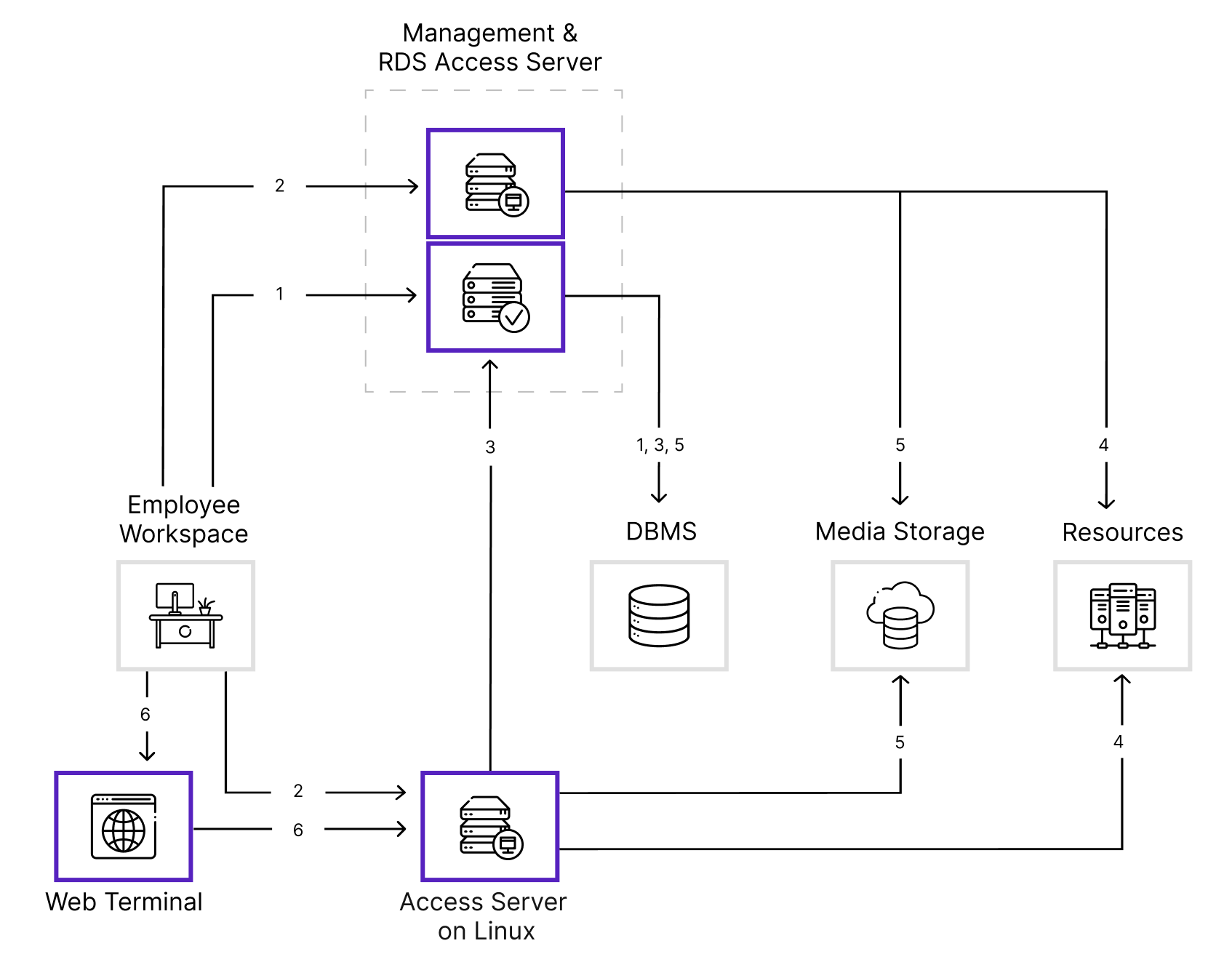
Axidian Privilege components are installed on three separate servers. In this deployment scheme, the Axidian Privilege business logic is isolated from the access components. Recommended for production deployments.
User scenario
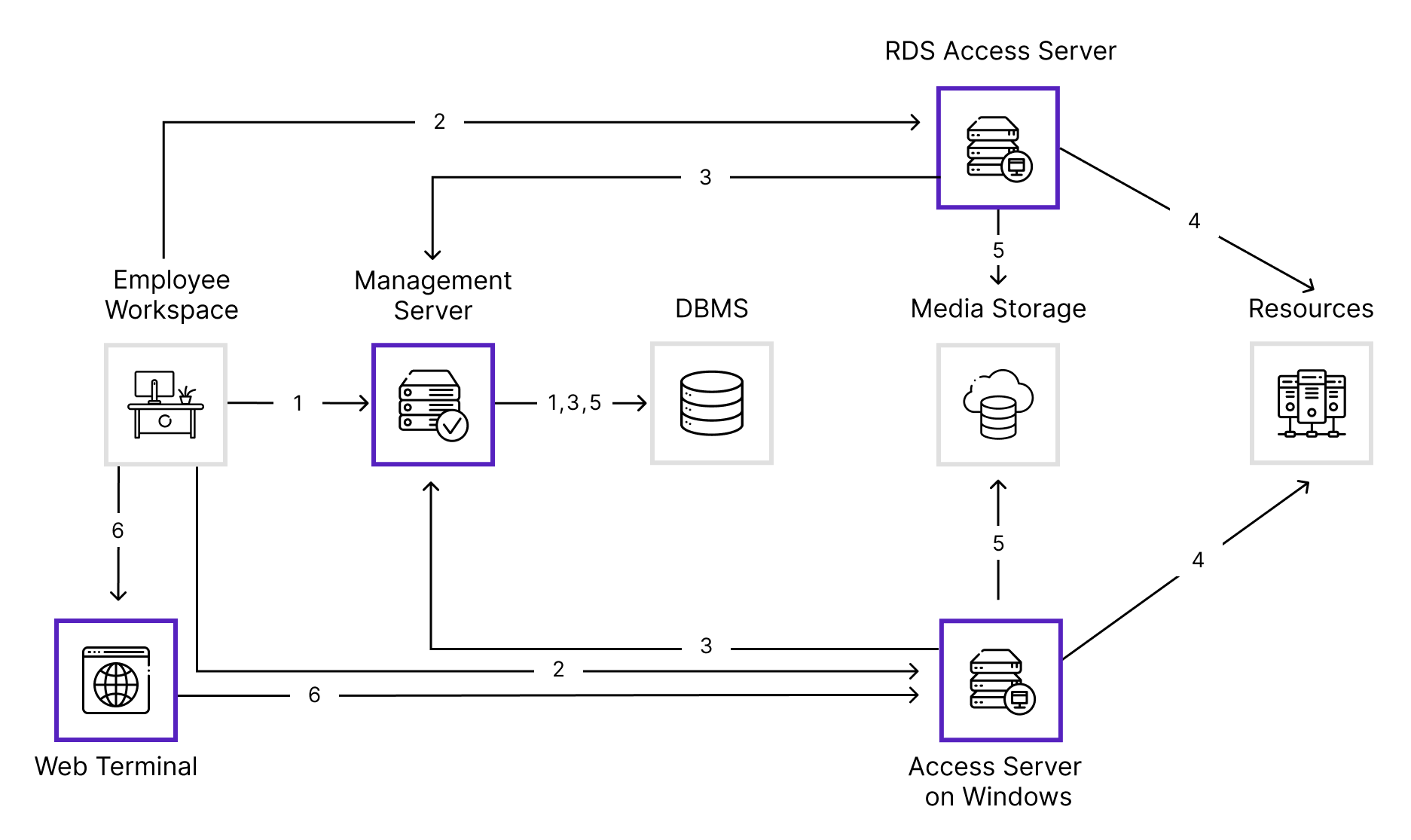
The Management Server can run on Windows or Linux.
- The user connects to the Management Server via the Desktop Console application or the user console in a browser. The Management Server authenticates the user by querying the IdP database or external authentication services to verify the user's credentials and provide a list of available resources from the Core database.
- After authentication, the user can connect to a resource through a proxy server:
- RDS Access Server — for sessions using the RDP protocol or in RemoteApp mode.
- Linux Access Server — for sessions using the RDP, SSH, SCP, SFTP, or HTTP (browser-based web session) protocols, as well as for connections to PostgreSQL and MSSQL databases via a console or client application.
- The Access Server queries the Management Server to re-authenticate the user, verify permissions, and retrieve privileged account credentials from the database.
- After verification, the Access Server opens a session to the target resource on behalf of the privileged account.
- During the session, the Access Server records the user's activity and saves the session video, transferred files, and screenshots to media storage, and the text log to the Core database. Session logging depends on the connection type.
- An SSH or RDP session can be launched in a browser via the Web Terminal, which is hosted on the Linux Access Server. The Access Server identifies the user through the Management Server and monitors the session on the resource.
Administrator scenario
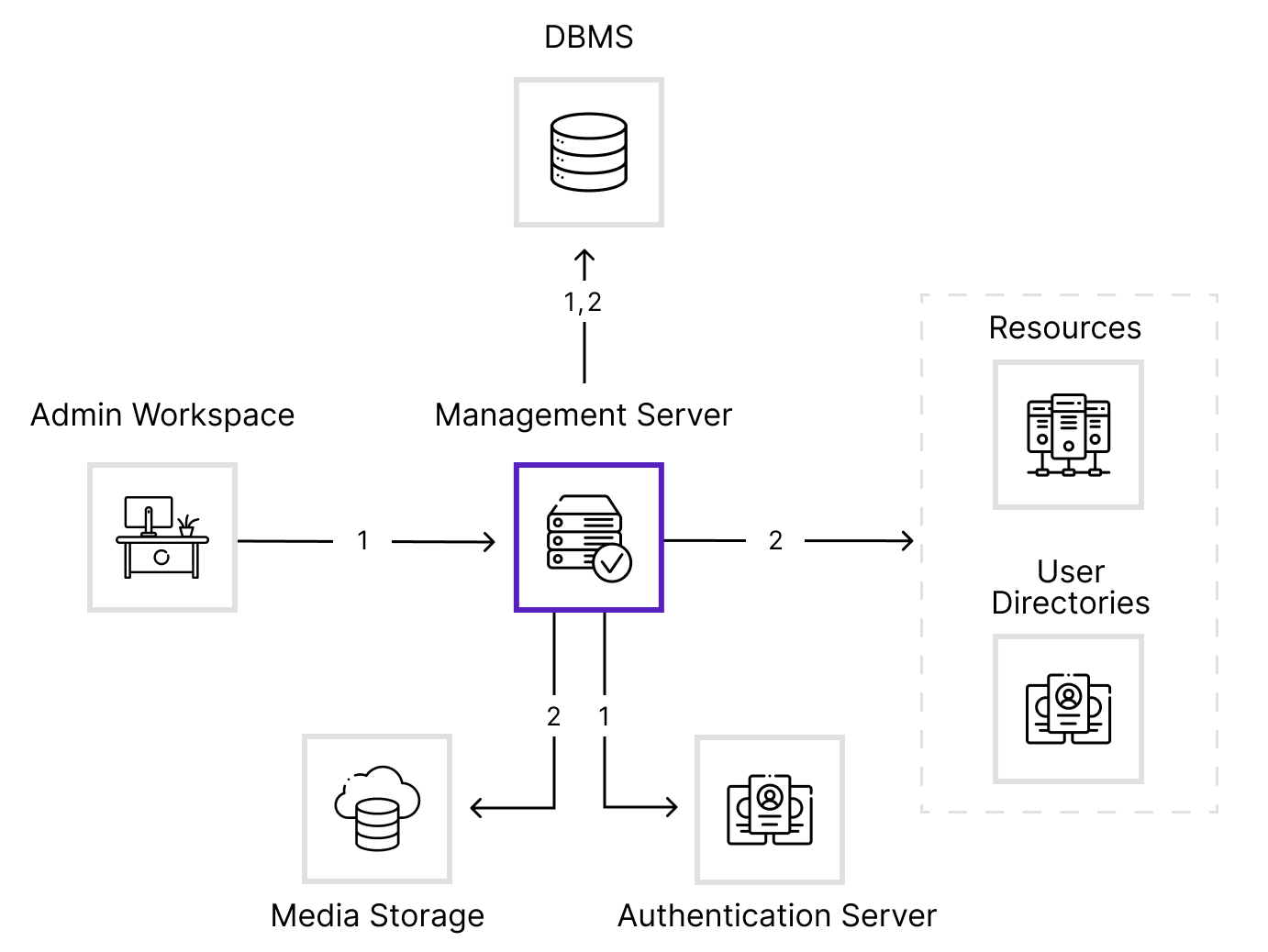
- Connecting to the management console
The administrator connects to the console on the Management Server via a browser. The Management Server verifies the account through the authentication server and queries the IdP database to identify the user and determine their privileges. - Administering Axidian Privilege
After authentication, the administrator manages PAM objects , i.e. resources, users, and access permissions, and performs audits and service operations.
In this deployment scenario, the servers hosting Axidian Privilege components are duplicated to ensure fault tolerance. Recommended for production deployments.
User scenario
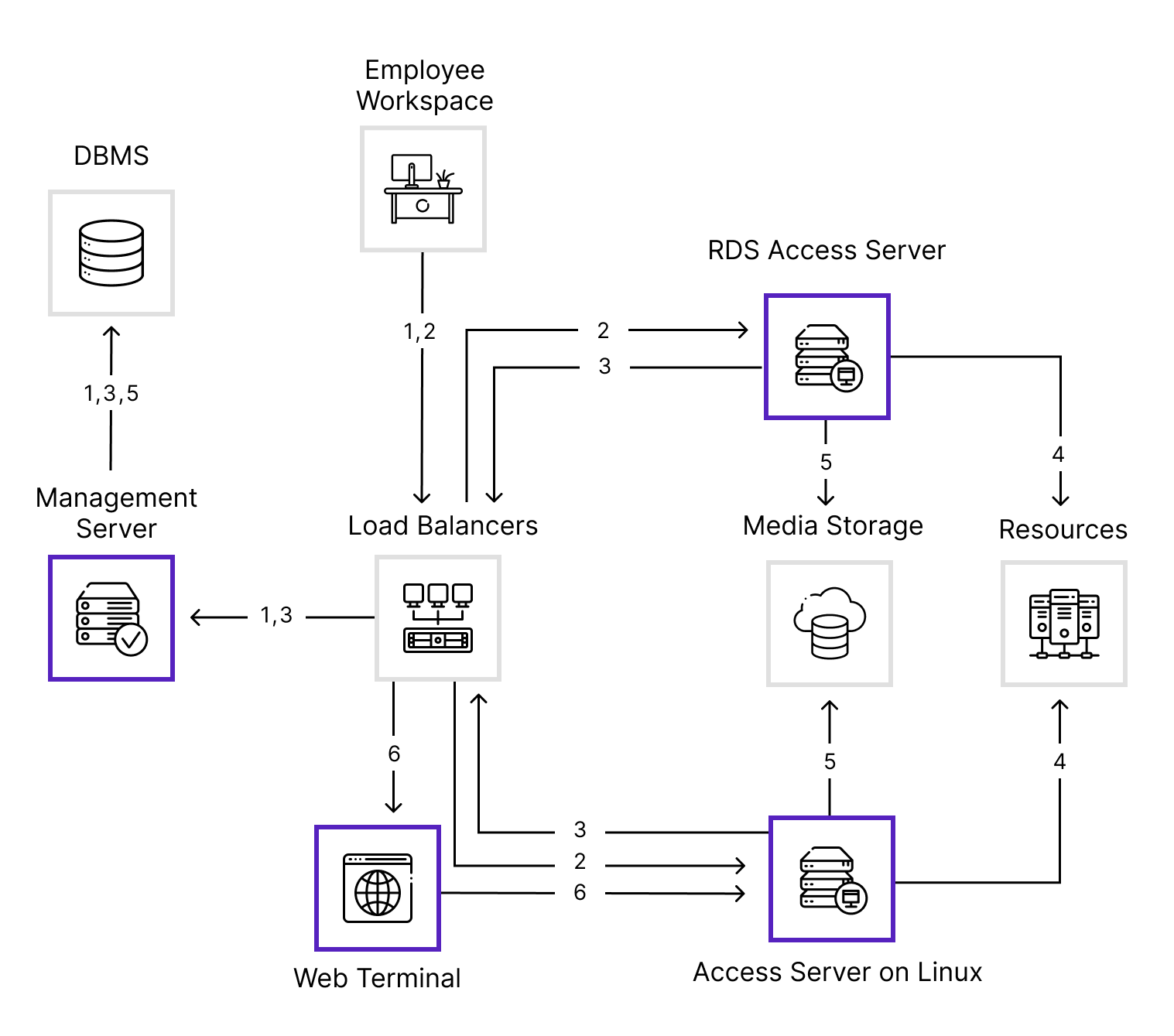
Interaction between the user and PAM components occurs through a load balancer.
The Management Server can run on Windows or Linux.
- The user connects to the Management Server via the Desktop Console application or the user console in a browser. The Management Server authenticates the user by querying the IdP database or external authentication services to verify the user's credentials and provide a list of available resources from the Core database.
- After authentication, the user can connect to a resource through a proxy server:
- RDS Access Server — for sessions using the RDP protocol or in RemoteApp mode.
- Linux Access Server — for sessions using the RDP, SSH, SCP, SFTP, or HTTP (browser-based web session) protocols, as well as for connections to PostgreSQL and MSSQL databases via a console or client application.
- The Access Server queries the Management Server to re-authenticate the user, verify permissions, and retrieve privileged account credentials from the database.
- After verification, the Access Server opens a session to the target resource on behalf of the privileged account.
- During the session, the Access Server records the user's activity and saves the session video, transferred files, and screenshots to media storage, and the text log to the Core database. Session logging depends on the connection type.
- An SSH or RDP session can be launched in a browser via the Web Terminal, which is hosted on the Linux Access Server. The Access Server identifies the user through the Management Server and monitors the session on the resource.
Administrator scenario
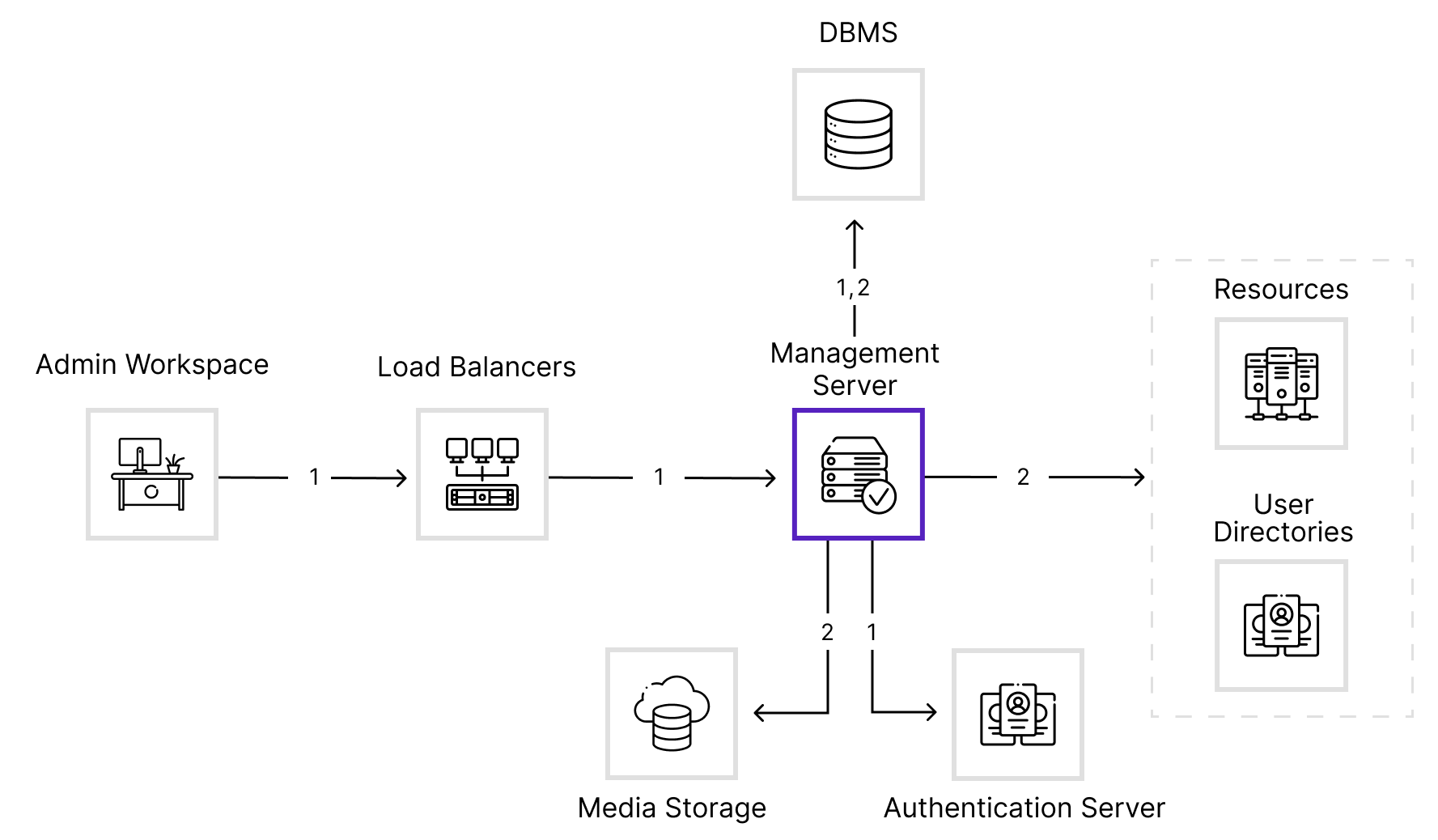
- Connecting to the management console
The administrator connects to the console on the Management Server via a browser. All actions go through the load balancer. The Management Server verifies the account through the authentication server and queries the IdP database to identify the user and determine their privileges. - Administering Axidian Privilege
After authentication, the administrator manages PAM objects , i.e. resources, users, and access permissions, and performs audits and service operations.
Axidian Privilege components are installed on two separate servers. Recommended for evaluation and testing.
User scenario
The Management Server and the RDS Access Server run on Windows and are hosted on the same server.
- The user connects to the Management Server via the Desktop Console application or the user console in a browser. The Management Server authenticates the user by querying the IdP database or external authentication services to verify the user's credentials and provide a list of available resources from the Core database.
- After authentication, the user can connect to a resource through a proxy server:
- RDS Access Server — for sessions using the RDP protocol or in RemoteApp mode.
- Linux Access Server — for sessions using the RDP, SSH, SCP, SFTP, or HTTP (browser-based web session) protocols, as well as for connections to PostgreSQL and MSSQL databases via a console or client application.
- The Access Server queries the Management Server to re-authenticate the user, verify permissions, and retrieve privileged account credentials from the database.
- After verification, the Access Server opens a session to the target resource on behalf of the privileged account.
- During the session, the Access Server records the user's activity and saves the session video, transferred files, and screenshots to media storage, and the text log to the Core database. Session logging depends on the connection type.
- An SSH or RDP session can be launched in a browser via the Web Terminal, which is hosted on the Linux Access Server. The Access Server identifies the user through the Management Server and monitors the session on the resource.
Administrator scenario
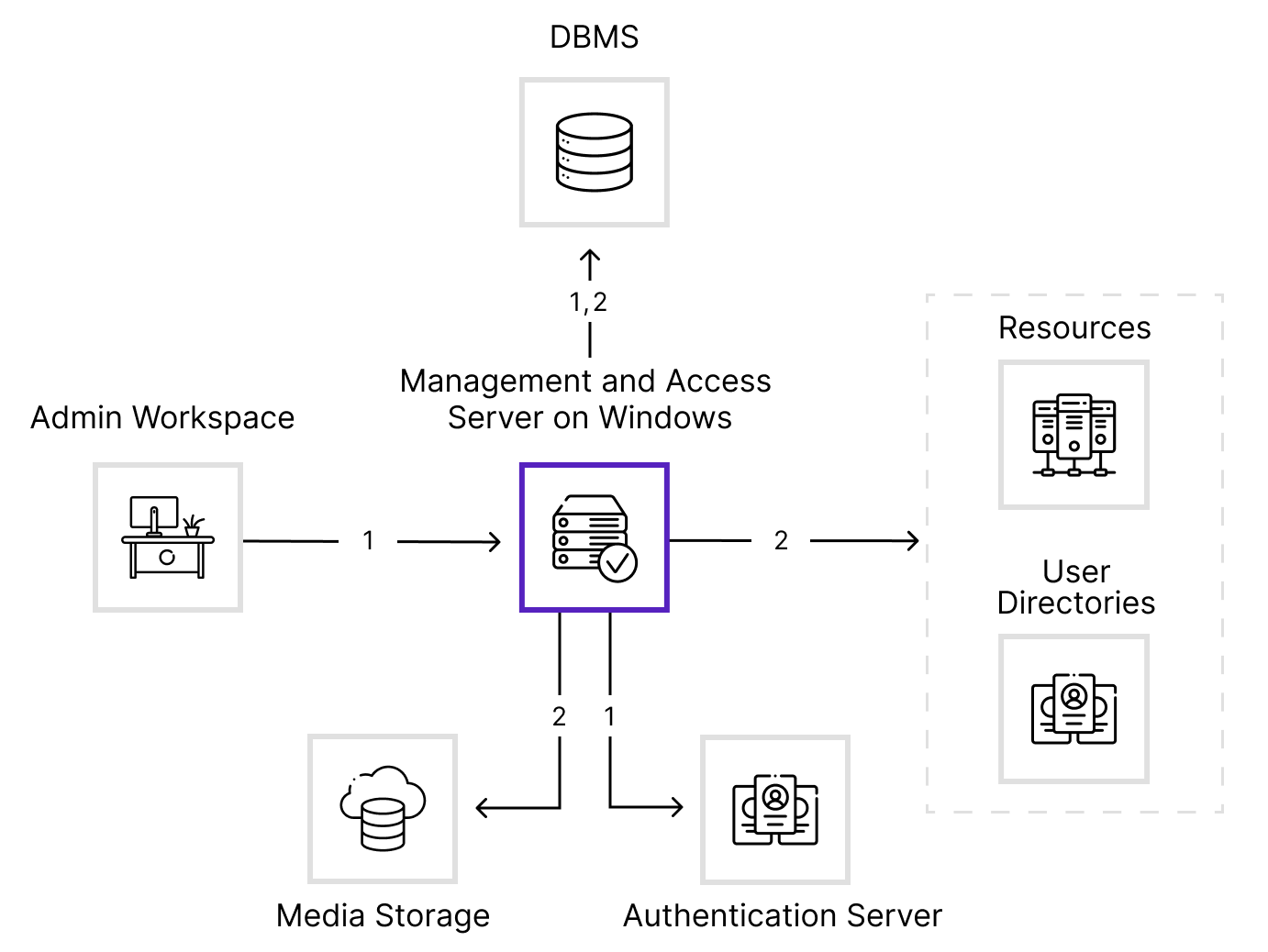
- Connecting to the management console
The administrator connects to the console on the Management Server via a browser. The Management Server verifies the account through the authentication server and queries the IdP database to identify the user and determine their privileges. - Administering Axidian Privilege
After authentication, the administrator manages PAM objects , i.e. resources, users, and access permissions, and performs audits and service operations.
Axidian Privilege components are installed on two separate servers. Recommended for evaluation and testing.
User scenario
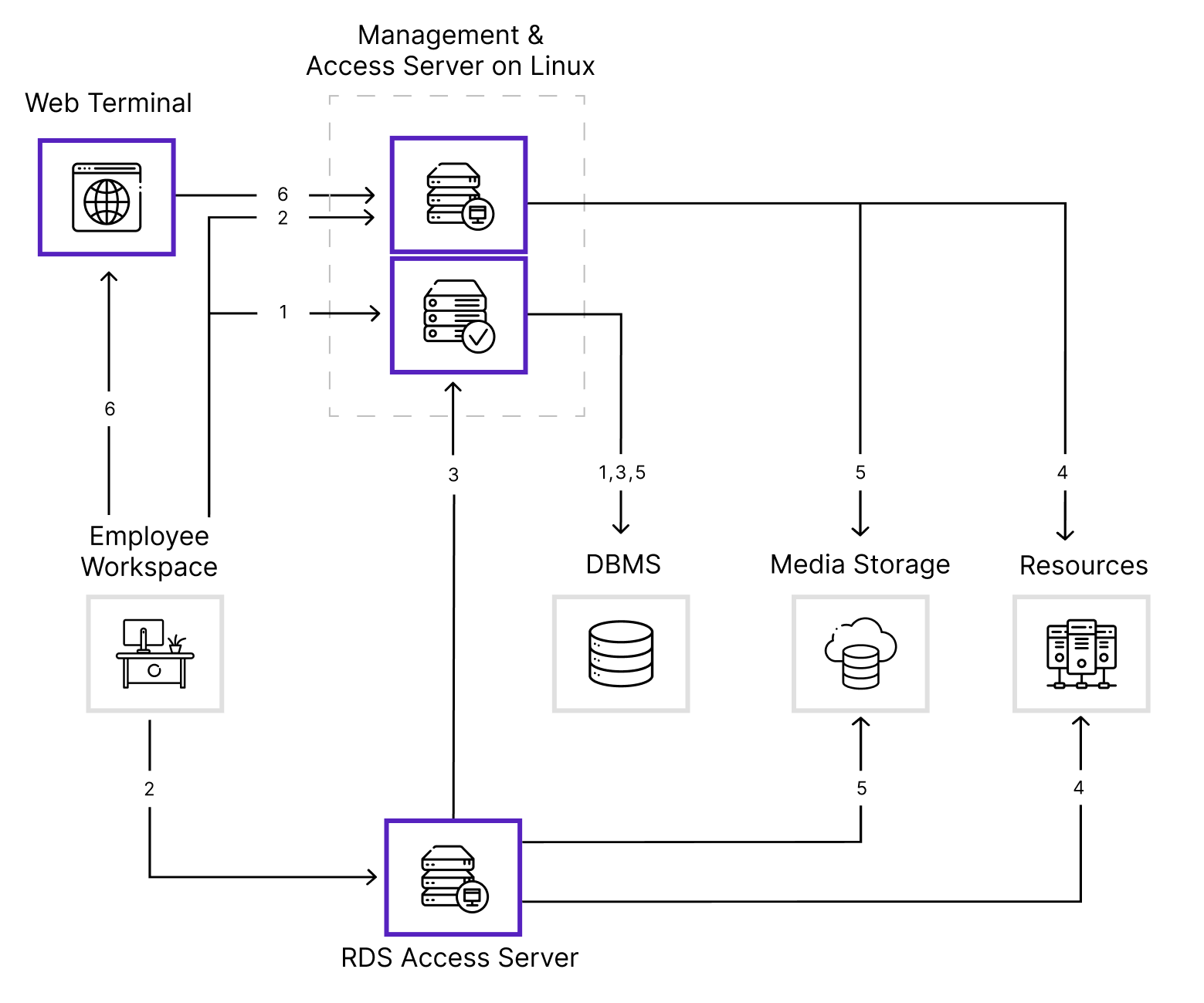
The Management Server and the SSH, RDP, Web, PostgreSQL, and MSSQL Access Servers run on Linux and are hosted on the same server.
- The user connects to the Management Server via the Desktop Console application or the user console in a browser. The Management Server authenticates the user by querying the IdP database or external authentication services to verify the user's credentials and provide a list of available resources from the Core database.
- After authentication, the user can connect to a resource through a proxy server:
- RDS Access Server — for sessions using the RDP protocol or in RemoteApp mode.
- Linux Access Server — for sessions using the RDP, SSH, SCP, SFTP, or HTTP (browser-based web session) protocols, as well as for connections to PostgreSQL and MSSQL databases via a console or client application.
- The Access Server queries the Management Server to re-authenticate the user, verify permissions, and retrieve privileged account credentials from the database.
- After verification, the Access Server opens a session to the target resource on behalf of the privileged account.
- During the session, the Access Server records the user's activity and saves the session video, transferred files, and screenshots to media storage, and the text log to the Core database. Session logging depends on the connection type.
- An SSH or RDP session can be launched in a browser via the Web Terminal, which is hosted on the Linux Access Server. The Access Server identifies the user through the Management Server and monitors the session on the resource.
Administrator scenario
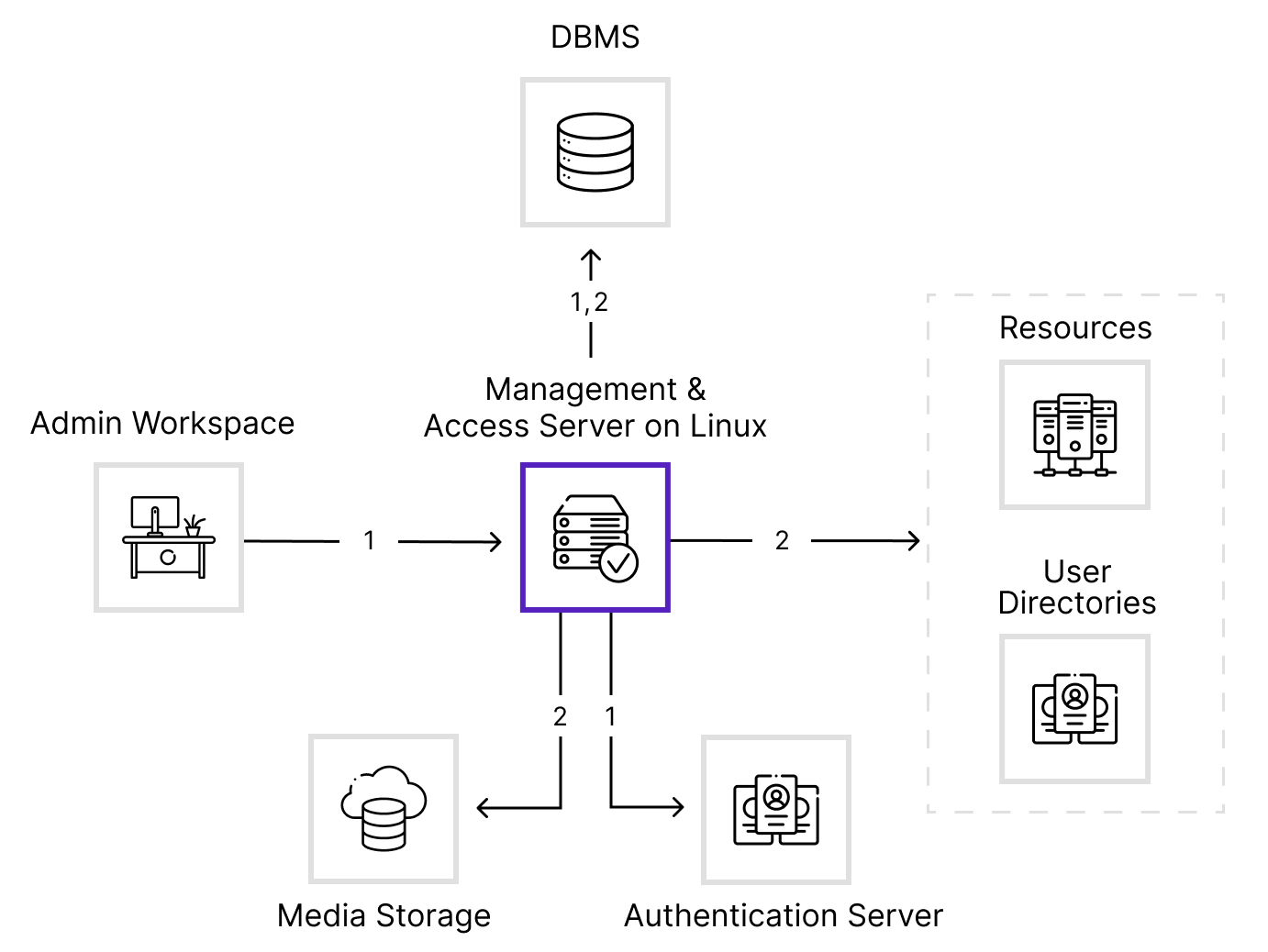
- Connecting to the management console
The administrator connects to the console on the Management Server via a browser. The Management Server verifies the account through the authentication server and queries the IdP database to identify the user and determine their privileges. - Administering Axidian Privilege
After authentication, the administrator manages PAM objects , i.e. resources, users, and access permissions, and performs audits and service operations.