Custom logs
In the Configuration → Custom logs section, you can configure dictionaries and custom log templates.
Dictionaries
A dictionary is a list of predefined values that you can select when you populate a field in Custom logs.
To create a dictionary:
- Click Create dictionary.
- Specify the dictionary's name, add values, and click Create.
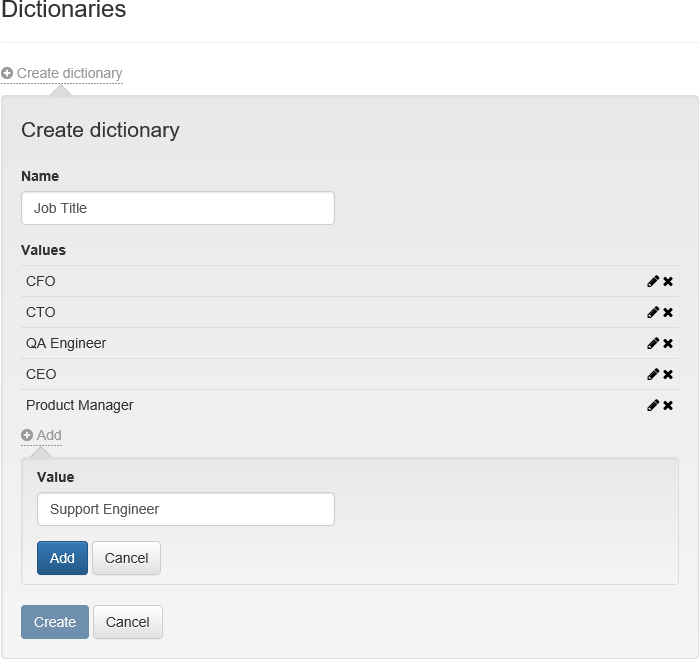
To edit a dictionary and its values, select  . To delete a dictionary, select
  .
.
info
You cannot delete a dictionary or a value that is currently in use.
Log templates
A custom log is a set of fields containing data about cards, certificates, and users.
To create an custom log template:
- Click Create log template.
- Specify the template's name.
- From the Objects type list, select Card, Certificate, or Custom.
- Select the applicable policies.
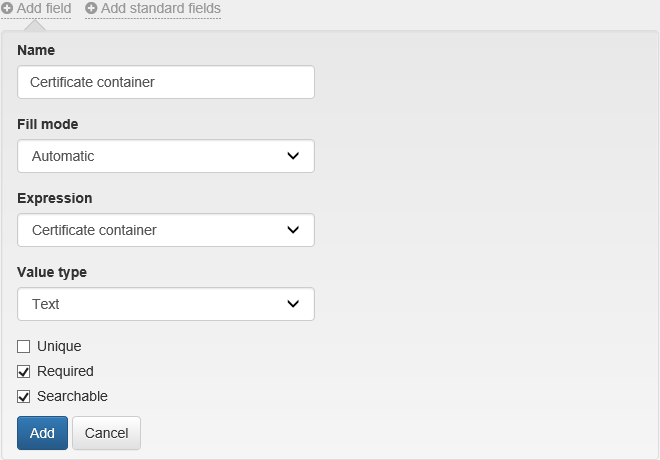
- Select Add field or Add standard fields for the Card and Certificate object types. A field is a log column containing information about a card or certificate.
- Specify the field name.
- From the Fill mode list, select:
- Manual
- Automatic: Select a suitable expression from the Expression list for the selected log type.
- Dictionary: Select a dictionary from the list.
- From the Value type list, select Text or Date.
- Configure the field parameters:
- Unique: If the field contains unique values.
- Required: This field is required.
- Search: Create a filter in the Custom logs section of the Management Console.
- Click Add and Create to save the template.
info
- For Object Type: Card, the Card serial number field is mandatory and unique.
- For Object Type: Certificate, the Certificate serial number and Card serial number fields are mandatory. These fields are not unique because a single card can store multiple certificates, or a common certificate can be written to different cards.
- When you edit a field, you can only change its name and the set of parameters: Unique, Required, Search.
To edit a log template, click . To delete a log template, click .
caution
When you delete a field from a template, the field is removed from all records in Custom logs.