SAML IDP
SAML IDP is configured for Windows authentication by default. For out-of-domain scenarios, enable the anonymous authentication in IIS.
Files for the SAML IDP installation are located at SAML IDP\<Version number>\.
- SAML.IDP-x64.msi: The installation package of SAML IDP.
- /Misc/Server2012/SAML.IIS.Install.MSServer2012.ps1: The script to install the required components of IIS server for Windows Server 2012.
Installation
Run the SAML.IDP-x64.msi installer to install SAML IDP.
In Default Web Site settings of IIS Manager, add HTTPS binding.
infoSAML IDP is a web application on the basis of IIS. Require SSL is a default installation setting that requires active HTTPS binding.
If you do not plan to use the HTTPS protocol, deactivate the SSL requirement in IIS settings for SAML IDP.
- Start IIS Manager and expand Sites.
- Select the Default Web Site site and in the Actions section, click Bindings.
- Click Add:
- For Type, select https.
- For Port, select 443.
- Select SSL Certificate.
- Save the binding.
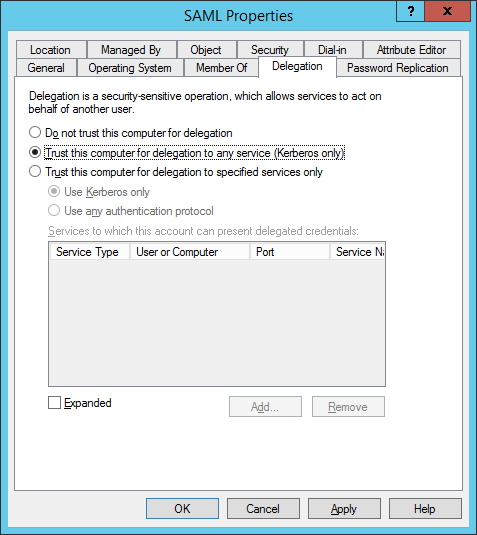
Configure the Kerberos delegation.
Add the SAML application to local Internet.
Modifying a configuration file
Open the SAML IDP configuration file C:...\uc\Web.config.
In the
Urlparameter of theamAuthServertag, specify the URL to connect to Axidian Access Core Server.The
Urlparameter is the url address of Axidian Access Core Server in the following format: http(s)://full_dns_name/am/core/.infoTo ignore server certificate errors, open the \idp\Config\applicationSettings.config file and set the
isIgnoreCertErrorsparameter totrue.Example
<amAuthServer Url="https://amserv.axidian-id.local/am/core/"/>Specify the provider ID in the
amAuthMethodstag in the following format:If only one provider is used for the authentication.
Example
<amAuthMethod id="SMSOTP">
    <amAuthProviders>
        <amAuthProvider id="ebb6f3fa-a400-45f4-853a-d517d89ac2a3" />
    </amAuthProviders>
</amAuthMethod>
If several providers are used for authentication in the form of authentication provider chain:
noteIf Windows Password + any provider chain is used:
- Windows Password is entered correctly, another provider entered incorrectly: Logon history for the user shows successful login to SAML Identity Provider with Windows Password.
- Windows Password is entered correctly, another provider entered correctly: Logon history for the user shows successful login with another selected provider.
Example
<amAuthMethod id="HOTP_Passcode_SMS">
    <amAuthProviders>
        <amAuthProvider id="AD3FBA95-AE99-4773-93A3-6530A29C7556" />
        <amAuthProvider id="F696F05D-5466-42b4-BF52-21BEE1CB9529" />
        <amAuthProvider id="ebb6f3fa-a400-45f4-853a-d517d89ac2a3" />
    </amAuthProviders>
</amAuthMethod>
Where:
- The
idparameter of theamAuthMethodtag is a unique value. - The
idparameter of theamAuthProvidertag is the ID of the provider used.
Supported providers
SMS OTP: {EBB6F3FA-A400-45F4-853A-D517D89AC2A3}
EMAIL OTP: {093F612B-727E-44E7-9C95-095F07CBB94B}
Passcode: {F696F05D-5466-42b4-BF52-21BEE1CB9529}
Software OTP: {0FA7FDB4-3652-4B55-B0C0-469A1E9D31F0}
HOTP Provider: {AD3FBA95-AE99-4773-93A3-6530A29C7556}
TOTP Provider: {CEB3FEAF-86ED-4A5A-BD3F-6A7B6E60CA05}
Axidian Key Provider: {DEEF0CB8-AD2F-4B89-964A-B6C7ECA80C68}
Example of SAML IDP operation
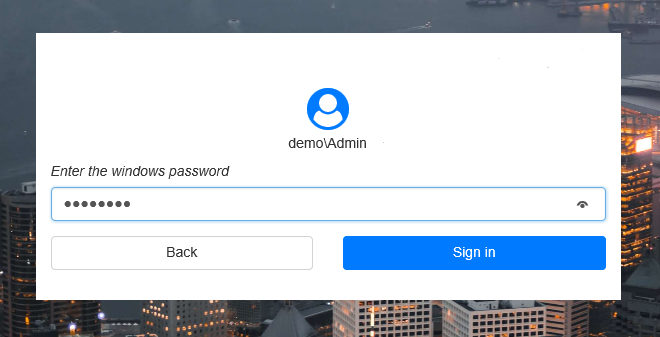
Open http(s)://full_dns_name/am/idp/ for authentication in SAML.
In the SAML authentication window that appears, click Back to select the authentication method. The last used method is selected by default.
infoIf Windows authentication is available and Anonymous authentication is disabled in IIS authentication methods, the username is added automatically and it cannot be configured. The user domain password is pasted in automatically.
If Anonymous authentication is available and Windows authentication is disabled, the username can be changed and the domain password must be entered manually.

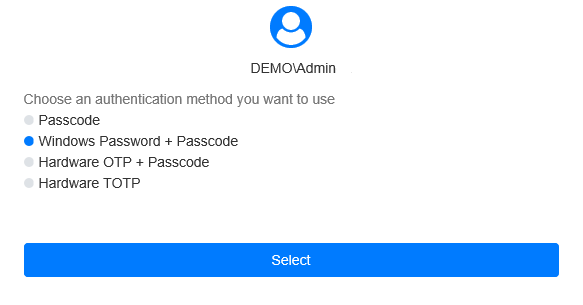
Select the authentication method and click Select.
infoIf a user does not have an authenticator, select the Windows Password method.
Enter the password and click Sign in. If the information is correct, the login is successfully performed.