ADFS Extension (2012)
With ADFS Extension, you can use multi-factor authentication for Microsoft ADFS server, thus adding the second factor to the access gaining process.
Files for the ADFS Extension installation are located at ADFS Extension\<Version number>\.
ADFS.Extension-x64.msi: Installation package for ADFS Extension.
Installation and configuration of ADFS Extension
Run the ADFS.Extension-x64.msi installer to install ADFS Extension.
Create a configuration file named MFAAdapter.json with the following parameters.
infoSMS OTP: {EBB6F3FA-A400-45F4-853A-D517D89AC2A3}
EMAIL OTP: {093F612B-727E-44E7-9C95-095F07CBB94B}
Passcode: {F696F05D-5466-42b4-BF52-21BEE1CB9529}
Software OTP: {0FA7FDB4-3652-4B55-B0C0-469A1E9D31F0}
HOTP Provider: {AD3FBA95-AE99-4773-93A3-6530A29C7556}
TOTP Provider{CEB3FEAF-86ED-4A5A-BD3F-6A7B6E60CA05}
Axidian Key Provider: {DEEF0CB8-AD2F-4B89-964A-B6C7ECA80C68}
Example
{
"ServerType":"eaNet",
"EANetServerURL":"http://YourDomainName/am/core/",
"ModeId":"{0FA7FDB4-3652-4B55-B0C0-469A1E9D31F0}",
"LSEventCacheDirectory": "C:\\EventCacheEa\\"
}
Run PowerShell as administrator. Enter the following information to register an adapter:
YourPatch\MFAAdapter.json: Specify the full path to the previously created configuration file.
Specify the version number of ADFS Extension used in the
$typeNamevariable,Versionparameter.Example
$typeName = "Axidian.ADFS.MFAAdapter.MFAAdapter, Axidian.ADFS.MFAAdapter, Version=1.0.6.0, Culture=neutral, PublicKeyToken=1ebb0d9282100d91"
Register-AdfsAuthenticationProvider -TypeName $typeName -Name "MFA Adapter" -ConfigurationFilePath 'YourPatch\MFAAdapter.json'
To remove an adapter, run the following command:
Example
Unregister-AdfsAuthenticationProvider -Name "MFA Adapter"To update the configuration, run the following command:
Example
Import-AdfsAuthenticationProviderConfigurationData -Name "MFA Adapter" -FilePath 'YourPatch\MFAAdapter.json'
Activation of multi-factor authentication for ADFS
- Open the AD FS management console.
- Select Authentication Policies and in the Actions window, select Edit Global Multi-factor Authentication.
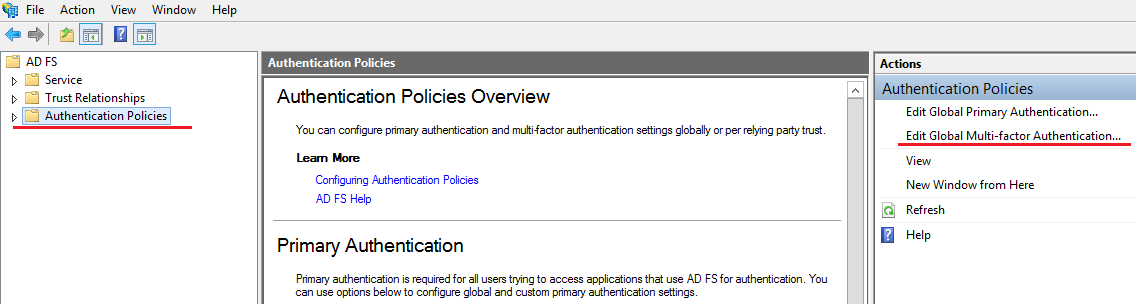
- Add a user/group and enable the following parameters:
- In Location, select Extranet and Intranet.
- Select the MFA Adapter provider.
- Restart the AD FS service to apply the changes.
Example of extension operation
- Open the ADFS test page: https://YourDomainName/adfs/ls/idpinitiatedsignon.htm
- Perform logging in.
- After you enter the username and password, specify the second factor information.
- If all data is correct, the login is successful.